3 Be able to capture audio sources using multitrack recording techniques
Recording Peace
Audio Sources
Recording a drum kit
Drums isn't an instrument that we use for our song but it is something that I have got involved in with setting up and mic'ing up to the studio and recording. Before setting up the microphones we ensured that the drum kit itself was set up properly. We moved away as much as we could that was surrounding the drum kit to prevent any other sounds that we didn't want. For example, there was a Cajon was near and every time the drum kit was played it would cause the Cajon to make noise, this is something we didn't want so we moved this out of the room. A microphone got set up on the hi hat because in our song this was something that was used a lot. A problem that we did have was that the microphone kept falling closer to the hi hat as it was getting played so we needed to make sure we had it a good enough distance away.

 A microphone was set up by the kick drum. Putting the microphone too close to the kick drum could cause distortion and it could be too loud. So having it a good enough distance away will give you a nice sound which is loud enough to be heard and a good quality of sound when you want to edit it in the mix.

We set up two microphones over the top of the drum kit, this will bring in all the sounds. It's important to have them on an equal level so one microphone doesn't pick up more sound than the other. This makes mixing the track much more easier too as the level of sound will be exactly the same/very similar to notice a difference. It's important to not put them too close to the drum kit.
Recording an acoustic guitar
An acoustic guitar is one of the main instruments through out the song we are recording. To record this we set up two microphones. From experience we all figured this would be the best way. We put one microphone facing the sound hole and another microphone aiming towards the middle/top end of the fret board, for us personally this created the best sound in which we were after. We didn't really have any problems with recording the acoustic guitar.

Recording bass
Picture of Archie recording the bass onto the Korg for our guide track:
Recording bass
When recording the bass we plugged it straight into the Korg. You can also do this by plugging it into the back of the mixing desk. This is called DI'ing. We thought it was a good idea to DI the bass because it's a quick way of recording it, it's clean and won't pick up any sound around us. We recorded the bass first because it's one of the main parts to the song and it is good to keep us all in time when we record the rest in the studio.
Picture of Archie recording the bass onto the Korg for our guide track:

Once we had recorded the bass through the Korg we did listen to it back in the studio and felt though it wasn't to a very good standard and it didn't give a great sound, so when we got a chance in the studio we recorded it in there to achieve the sound that we were really after.
Recording a Piano

We set up the microphones for recording the piano. We used AKG C1000S microphones for recording the piano and used two one on the left and one on the right. We put them in these places so we could get the best quality of sound and so everything would be picked up.

We set up the microphones for recording the piano. We used AKG C1000S microphones for recording the piano and used two one on the left and one on the right. We used these microphones We put them in these places so we could get the best quality of sound and so everything would be picked up.

To check that the microphones were working and picking up sound we scratched the microphones to see if it was actually picking anything up.


Recording a woodwind instrument
We don't use a woodwind instrument in our song that we are currently recording but I have looked online about how to record a woodwind instrument to see what the best recommended way to do this is. It is all really about opinion and how people feel is best, due to me not having any experience with this I can only base this on research and looking at other people's opinion rather than expressing my own view.
I'm going to specifically look at how to record a flute.

It is said that Brass instruments usually sound much better if they are recorded with a ribbon microphone. Depending on the style of music you are going to be playing really dictates what kind of microphone you should use. If you were recording a the flute in a jazzy way then a condenser microphone is something that is good to use. The reason why condenser microphones are suggested when recording this type of music is because it will capture more of the flute's 'many overtones' which will then leave you with a fantastic bright sound. If you were to use a dynamic microphone you would achieve a less bright and detailed flute sound. If you were recording a rock or R&B band then a dynamic microphone may be more suited to this.
Recording a flute with a ribbon microphone is a good idea especially if it is a flute soloist, it takes the eq incredibly well too.
Where should the microphone be placed?
Although it is hard to say where the microphones go as the sound will change depending on the style of the player, it is suggested that you place the microphone about 2 feet away. Some people will use an XY type of miking when recording the flute, where you put two cardiod microphones at a 45 degree angle from each other for a stereo sound. It's also important you experiment first to hear the player's feedback and how they think it sounds and if they are comfortable with it.

We don't use a woodwind instrument in our song that we are currently recording but I have looked online about how to record a woodwind instrument to see what the best recommended way to do this is. It is all really about opinion and how people feel is best, due to me not having any experience with this I can only base this on research and looking at other people's opinion rather than expressing my own view.
I'm going to specifically look at how to record a flute.
It is said that Brass instruments usually sound much better if they are recorded with a ribbon microphone. Depending on the style of music you are going to be playing really dictates what kind of microphone you should use. If you were recording a the flute in a jazzy way then a condenser microphone is something that is good to use. The reason why condenser microphones are suggested when recording this type of music is because it will capture more of the flute's 'many overtones' which will then leave you with a fantastic bright sound. If you were to use a dynamic microphone you would achieve a less bright and detailed flute sound. If you were recording a rock or R&B band then a dynamic microphone may be more suited to this.
Recording a flute with a ribbon microphone is a good idea especially if it is a flute soloist, it takes the eq incredibly well too.
Where should the microphone be placed?
Although it is hard to say where the microphones go as the sound will change depending on the style of the player, it is suggested that you place the microphone about 2 feet away. Some people will use an XY type of miking when recording the flute, where you put two cardiod microphones at a 45 degree angle from each other for a stereo sound. It's also important you experiment first to hear the player's feedback and how they think it sounds and if they are comfortable with it.
Recording a brass instrument
Within the project we are doing and the song that we're recording we don't use any brass instruments, but I have researched online to learn a little bit about as it's important to know the ways to record different instruments even if it's not something you're going to be using it's good to boost your knowledge. I am going to look at how to record a trumpet. I have looked through many websites and came to a conclusion that the best way to record a trumpet is to:
- Starting with a microphone about 2 metres from the bell and about 30 degrees off-axis.
- If you're recording a trumpet it is much easier to have the microphone from above, this is because most trumpet players aim the instrument downwards, where as if you were to record a trombone then it would be best to have the microphone coming from below.
- Depending on what kind of sound you are after - Having the microphone closer will give you a much brighter and cleaner sound and if you have the microphone further away it will create a much more dramatic sound.
- Something that I discovered can be quite effective is to get the musician to face a wall or a window whilst they are playing, this is good to create a detailed sound, doing it this way can also give a lot of feed back which can be an advantage.
- If the microphone is placed too close it can distort the tonal balance, some microphones cannot cope with the sound pressure level if placed closer than a metre.
- Recording a trumpet with a dynamic mic would be fine and give you a good sound as well as any standard studio capacitor mic, but electrets and ribbon microphones could go into over load. Dynamic microphones can take a lot that's why these microphones are recommended when recording a trumpet. Ribbon microphones have been known to be damaged and get split diaphragms when it is placed too close to the firing line of trumpets and trombones, so if you are wanting to use a ribbon microphone it would be a good idea to have it placed a good distance away on-axis, this will create a natural and soft sound.
- Large-diaphragm microphones work best.
Recording a trumpet:

Recording orchestral instruments
Again we don't use any orchestral instruments within our song so I'm going to research and look into recording a violin. I found an article on Sound on Sound. Depending on what kind of sound you after depends on how you record, just like most things. This article that I looked at suggested that if you are after a natural sound from a violin then you need to give it space. If you set up mic's close the sound that you will get will be 'coloured'. If you were to record in a 'small, dead acoustic' then the sound you will achieve will be exactly that.
Whilst I was doing my research I found that it was known to apparently be better to use small-diaphragm omnidirectional mics, this is because people think that they give a much more natural sound than cardiod or ribbon mic's. This gives a smoother sound but still leaving a hint of the edge and strong detail.
For stereo recording Sound on Sound advise to use X-Y ribbons or spaced omni small-diaphragm condensers, with spacing of about 30cm.
From research I discovered it was best to stay away from anything which has a big presence peak. There is no specific way as to where the microphones should be situated, this is something you should experiment yourself depending on what you're after, if you move around the microphones and test it out you will notice the difference.
Using a room which is filled with wood, like a wooden stage or wooden walls is great as it emphasis's the tonal qualities on the instrument and pointing the microphone slightly tilted toward the upper bout is a good positioning.
Moving the microphone more towards the F holes then the sound it will create is a much more resonant low-mid frequency than if it is pointed more in the direction of the fingerboard. If the microphone is placed facing the bridge, you will get a much more harsher sound, this can be better.
Depending on the type of microphone really makes it depends on how far away it needs to be from the violin. If you're doing classical music then it's best to not put it too close. A non-omnidirectional microphone again don't put it too close. Violins are very sensitive so keep as much distance as possible if you were to use a directional microphone.
Diagram of recording a violin:


Again we don't use any orchestral instruments within our song so I'm going to research and look into recording a violin. I found an article on Sound on Sound. Depending on what kind of sound you after depends on how you record, just like most things. This article that I looked at suggested that if you are after a natural sound from a violin then you need to give it space. If you set up mic's close the sound that you will get will be 'coloured'. If you were to record in a 'small, dead acoustic' then the sound you will achieve will be exactly that.
Whilst I was doing my research I found that it was known to apparently be better to use small-diaphragm omnidirectional mics, this is because people think that they give a much more natural sound than cardiod or ribbon mic's. This gives a smoother sound but still leaving a hint of the edge and strong detail.
For stereo recording Sound on Sound advise to use X-Y ribbons or spaced omni small-diaphragm condensers, with spacing of about 30cm.
From research I discovered it was best to stay away from anything which has a big presence peak. There is no specific way as to where the microphones should be situated, this is something you should experiment yourself depending on what you're after, if you move around the microphones and test it out you will notice the difference.
Using a room which is filled with wood, like a wooden stage or wooden walls is great as it emphasis's the tonal qualities on the instrument and pointing the microphone slightly tilted toward the upper bout is a good positioning.
Moving the microphone more towards the F holes then the sound it will create is a much more resonant low-mid frequency than if it is pointed more in the direction of the fingerboard. If the microphone is placed facing the bridge, you will get a much more harsher sound, this can be better.
Depending on the type of microphone really makes it depends on how far away it needs to be from the violin. If you're doing classical music then it's best to not put it too close. A non-omnidirectional microphone again don't put it too close. Violins are very sensitive so keep as much distance as possible if you were to use a directional microphone.
Diagram of recording a violin:
Recording single voices
When recording single voices we only need one microphone, which in this particular recording task we have been using a Condenser microphone. This type of microphone is especially good for recording vocals because they are sensitive.
For each time some one is recording their part we adjust the height of the microphone which best suits them. It has to be at a level which feels best for the person recording, and what feels most comfortable. Personally for me I like it just at the right height or a little lower as I don't feel comfortable if it is higher but it all depends on how it feels for the individual.
We have been using pop shields this is to soften the singing and just generally give it a cleaner sound. This is what a pop shield looks like:
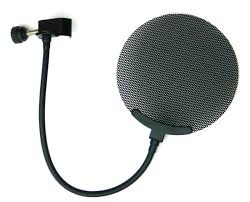
 The picture to the left is what we used for recording vocal. The microphone is placed in the middle of it. The reason why we use microphone shields is because a vocal microphone is very sensitive so it will pick up any reflections from any walls or surfaces behind and also the sides of the singer. It's important to use a reflection filter or if not acoustic treatment is something you should be aiming for.
For each time some one is recording their part we adjust the height of the microphone which best suits them. It has to be at a level which feels best for the person recording, and what feels most comfortable. Personally for me I like it just at the right height or a little lower as I don't feel comfortable if it is higher but it all depends on how it feels for the individual.
We have been using pop shields this is to soften the singing and just generally give it a cleaner sound. This is what a pop shield looks like:
The picture to the left is what we used for recording vocal. The microphone is placed in the middle of it. The reason why we use microphone shields is because a vocal microphone is very sensitive so it will pick up any reflections from any walls or surfaces behind and also the sides of the singer. It's important to use a reflection filter or if not acoustic treatment is something you should be aiming for. Recording multiple voices
Technical issues
We have had some technical issues whilst recording our track. The mixing desk stopped working altogether, so we have recorded the guide track and the bass onto the Korg D1600 to get things moving quicker and it is also really good quality of sound so it doesn't make much of a difference. This did hold us back quite a fair bit and caused us to be behind slightly, but we put in more effort to catch up.
Talk back
Below is a picture of the 'talk button' which you also use to communicate with each other by holding it down and speaking and they can hear it through their headphones and when they speak back into the mic's it comes through the speakers in the studio, this is a great way of communicating so you can always let each other know when you're going to start recording, what's going on, and if any problems that are occurring. It's good for the person actually recording so they always know what is happening.

Fold back
'Stage monitors' is another term used for 'Fold back'. It's the use of rear-facing heavy-duty loud speakers which are also known as monitor speaker cabinets. These are used on stage for live performances. The speakers are also aimed at the actual performer itself, not the audience. The sound signal can be produced on the exact same mixing console as the main mix which is for the actual audience, this is called the 'front of house' mix, but there can instead be a separate sound engineer for this and a different mixing console on or beside stage which will create a completely different mix for the monitor system.
If we didn't use the foldback system then the sounds that the performer would actually be hearing from the front of house would just be reverberated reflections bouncing from the rear wall from the venue/area that they are performing in. This could then cause the singing to sing out of time with the band due to their being a slight delay and distortion as it is a natural reflected sound. The performers might also need to hear a mix which doesn't include the electronic effects, things like reverb or echo so there will be a seperate mix which is routed to the foldback speakers, this is called a 'dry mix'. This helps the performers to stay in tight time and also to stay in tune with each other. In some cases there are bad foldback mixes which will cause the vocalists to sing off, out of tune or out of time with the band that's why it's so important to be careful to get it right.
 A floor monitor speaker cabinet with a 12'' woofer and a ''bullet'' tweeter
'Stage monitors' is another term used for 'Fold back'. It's the use of rear-facing heavy-duty loud speakers which are also known as monitor speaker cabinets. These are used on stage for live performances. The speakers are also aimed at the actual performer itself, not the audience. The sound signal can be produced on the exact same mixing console as the main mix which is for the actual audience, this is called the 'front of house' mix, but there can instead be a separate sound engineer for this and a different mixing console on or beside stage which will create a completely different mix for the monitor system.
If we didn't use the foldback system then the sounds that the performer would actually be hearing from the front of house would just be reverberated reflections bouncing from the rear wall from the venue/area that they are performing in. This could then cause the singing to sing out of time with the band due to their being a slight delay and distortion as it is a natural reflected sound. The performers might also need to hear a mix which doesn't include the electronic effects, things like reverb or echo so there will be a seperate mix which is routed to the foldback speakers, this is called a 'dry mix'. This helps the performers to stay in tight time and also to stay in tune with each other. In some cases there are bad foldback mixes which will cause the vocalists to sing off, out of tune or out of time with the band that's why it's so important to be careful to get it right.
A floor monitor speaker cabinet with a 12'' woofer and a ''bullet'' tweeterClick track
When using the Korg in order to put a click on you click the button that says 'Tempo/rhythm' and then you get onto a screen that looks like this. You then change it to what tempo you want it/how fast you want the click. We use this in order to keep in time and it plays in the headphones.

Managing takes
Managing takes is when you are looking back at your recordings and choosing which ones you want to use and which fit best for what you are recording. Also, during the recording process we took it in turns with managing the takes and who was in charge of pressing play, stop, and play back, this person was also in charge of talking to the person recording and communicating with them. If you manage the takes then you will need to play back several takes that you've done and really listen carefully to what the sound is you want and whether it fits what you're after. I also discovered that if you are to delete a take then you can't just press undo you need to actually press delete to ensure it deletes off the computer altogether otherwise it will just stay there, this could cause problems for the recordings. You may choose to keep a lot of the takes you've done and then look back at them at the end to choose the ones you want, or you may just play back after recording and know straight away that you don't want that take therefore it will be deleted.

Data storage/archive
When you record it automatically saves to where you've set it to save; your project folder. It's important to do this to prevent any work going missing or deleting anything.
Track laying/Overdubbing
Track laying/Overdubbing
Track laying is when you are literally laying the track down. So, recording each instrument at a time, and the order you do it in is always personal opinion on how you think it works best. Within the project of recording our piece song this is how we did it:
- Guide track- Recording a guide track is good and something I would advise because it gives you a good idea of what you're doing and where you need to start. We did this because we had several instruments and vocals to do, so recording this guide track was good because it gave us all an outline of what we were aiming for. The guide track doesn't need to be perfect.
- Bass- We did this first because we felt it was a strong part in the song and it also as the first instrument that is introduced to the song so we felt it was vital to have this recorded first.
- Guitar- We recorded this next as it gave the song some structure and gave us something to work with
- Piano- This was the next thing we recorded, it was the last instrument we used and we wanted to do vocals last.
- Vocals- We did this by doing each persons vocals at a time, and Mohan who was the lead vocals for harmonies we did his first as it was like the guide, we then layered up everyone elses harmonies on top of these.
Tuning issues
We didn't have much tuning issues, anyone that was recording an instrument was in charge of tuning their instrument and making sure it sounded fine. If someone noticed that the instrument sounded dodgy and out of tune we could speak up and say so it didn't make the recording sound bad. Any tuning issues that could have happened are things like if the strings were old and damaged then it's never going to really sound good, not until the strings are changed. Luckily this didn't happen for us and all instruments used were in good condition.


We didn't have much tuning issues, anyone that was recording an instrument was in charge of tuning their instrument and making sure it sounded fine. If someone noticed that the instrument sounded dodgy and out of tune we could speak up and say so it didn't make the recording sound bad. Any tuning issues that could have happened are things like if the strings were old and damaged then it's never going to really sound good, not until the strings are changed. Luckily this didn't happen for us and all instruments used were in good condition.
Working with musicians
Working wit musicians can sometimes be very difficult. If there is miscommunication then this could cause things to go wrong and things wont go as smoothly as they could have gone. This is why it's important to have good communication skills. In the point below I talk about ways of communicating which help sessions to run better. Working with musicians can really test your patience, especially if you have disagreements. It's good to keep it professional even if you are friends. I found that within our group we all had pretty good communication and we all worked well with each other.
Communication

When recording in the studio there is two ways in which you can communicate. If you are playing an instrument/singing in the ensemble room and you are in the studio you can communicate through this window which looks into each of the rooms where you can give hand signals etc.

Below is the talk button in which you can talk to each other through this:
Organisation
As a group we have been assigning each other to certain jobs. Kinds of jobs that we can individually take charge of:
- Setting up microphones
- Setting up Cubase/Korg
- Plugging in instruments
- Getting equipment together
We figured it would be a good idea to each lesson switch job, this is so everyone gets a go at doing different things and can have experience on everything. It also makes setting up run faster because we know where all our group members are and everyone is clear on what they are meant to be doing. Not being organised can also cause things to go wrong and it wastes time.
Timekeeping
Timekeeping is probably something I found our group didn't really take close care of. We could have been more careful with our time which could have made us complete our project quicker. Time keeping is good because:
- It helps things run smoothly
- You know what should be happening when, and what should be done by a certain time
We did keep records of our project because it helped us see our progress and see what we needed to do next, this comes under organisation also because each lesson we always knew what we needed to do next.
Kinds of things we kept records of:
- What we've done so far
- What needs to be done next
- What instruments we need to record
- What we need to improve on/re record
Preparation
When we first started to do this project preparing to start recording was something that took quite a long time as we wasn't completely sure as to what we were doing and it was more of experimenting and trial and error but as the weeks went on it's something that we all became much more familiar with and was a much easier process. We sometimes come into the studio a bit before the lesson has started just to get everything set up in advance giving us more recording time. I personally think that we could have been more organised with preparing, we could have completed the project much faster leaving us more time to edit and change things.
Clearing up
Clearing up
Clearing up any instruments and equipment you have used is important so that:
- It's ready for the next person to use
- Everything stays in good condition and doesn't get broken
- Everyone knows where all the equipment is and is in the right places
If people don't tidy up properly then it will cause things to go missing/broken.

No comments:
Post a Comment